
Hello,
Today we are going to discuss alternate ways to display data from an external table in Alpha Software. Typically, if you need data displayed you would create a form or browse view displaying the data from the table you want.
Let’s say you have a form open and you want to display data from a closed table based on an object you gave focus to on the open form. You could create and xdialog form to display the data, pop up a form from the table displaying the data or create a set linking the current table to the closed table making the data available for display. I say there is another choice. Display the data in a bubble help window.
As an example, suppose you have a form which displays a list of contact notes or reminders, but the form and associated table does not have contact information for the contacts in the list. With this procedure the user selects a contact in the list and then hovers the mouse pointer over the list and the contact information will display in the bubble help window. Here is how it’s done.
First we declare our variable and set a generic message for our bubble help of the list object on the form. Then we open the external table and fetch through the table looking for a match between a value in the external table and our list variable. Once found, it builds the mynote character string using the tbl. method. Finally we end the fetch with end while and close the opened table with tbl.close()
dim SHARED mynote as C
ContactNotes:VContacts.bubble_help = "<xdlg>{background = Canvas}{font = Arial,9,b}{wrap = 50}ContactNotes:vcontacts.bubble_helpSelect contact to view contact information."
tbl = table.open("rolodexentry")
tbl.fetch_first()
while .not. tbl.fetch_eof()
    if Alltrim(tbl.Sfname) = var->vContacts then
        mynote = "Home Phone: "+Alltrim(tbl.home_phone)+crlf()+"Cell Phone: "+Alltrim(tbl.cell_phone)+" "+tbl.ext+crlf()+"Work Phone: "+Alltrim(tbl.Company_phone)+crlf()+"Personal Email: "+Alltrim(tbl.Home_email)+crlf()+"Work Email: "+Alltrim(tbl.Work_email)
    end if
tbl.fetch_next()
end while
tbl.close()
ContactNotes:VContacts.bubble_help = Var->mynote
Once the user selects a contact the bubble help window displays the results of mynote as the help. The poor quality image below gives you an idea of how your bubble help will display as written above.
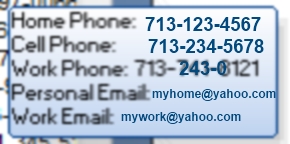
Note:(I blew up and modified the bubble help image to make it easier to see and to hide any actual information.)
I hope you found this example interesting and or helpful; and as always if you need specific help, contact us at nlawson@cdc-technical.com. All work is guaranteed
 Custome Database Design with Alpha Software
Leave a comment