
Many small businesses use spreadsheets for their daily data processing. While it is OK, it does not provide the business with proper data analysis and trend forecasting. For that, they need a database.
Alpha Software has easy procedures for extracting and using data in a spreadsheet eliminating the need for double entry, thus giving the end user the best of both worlds.
You could use the standard import procedures but that would require the user to save the spreadsheet in the workbook as an old style .xls sheet which they may or may not know how to do. AlphaDAO uses SQL connections to point to the sheet and extract the data you wish to see.
From the File Menu option on the control panel, select Import then Remote (SQL) Data with the AlphaDAO choice. see image:
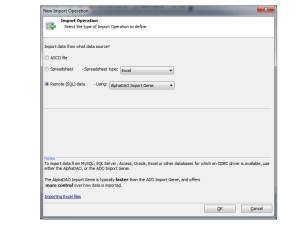
Follow the on screen wizard to help you build and test the spreadsheet connection. Once done, your screen should look something like this:
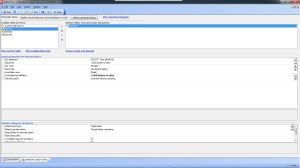
If you convert the import to XBasic, your code will look like this:
'Date Created: 23-Mar-2012 10:19:10 AM
 'Last Updated: 23-Mar-2012 12:04:38 PM
 'Created By  : cdc
 'Updated By  : cdc
 dim connectionString as c
 connectionString = "{A5API='Excel',A5Syntax='Excel',FileName='C:\TCFixit\RegisterAudit.xls', A5ExcelVersion=2000}"
delete options
 dim options as p
 options.ConsolidateArguments= .t.
 options.AddTablesToDatabase= .t.
 options.ShowProgress= .t.
 options.AllowCancel= .t.
delete a_import
 dim a_import[0] as p
a_import[].ObjectName = "Sheet1$"
 a_import[..].SQLSelectStatement = "SELECT * from [Sheet1$]"
 a_import[..].SQLType = "Portable"
 a_import[..].Arguments = ""
 a_import[..].ImportType = "Create table"
 a_import[..].LocalTableName = a5.get_path() + chr(92) + "Reg_Audit"+".dbf"
 a_import[..].LocalTableFieldDef = <<%txt%
 <SizeToFit=.F.>
 <ConvertTimeToDate=.F.>
 <DefineFieldOverrides=.T.>
 <OverrideDefinitions=<<%str%
 Register_audit,C,35,0
 F2,N,15,2
 %str%>
 %txt%
 a_import[..].OverwriteOption = "Overwrite without prompting"
dim flagSilent as l
 delete args
 dim args as sql::arguments
 flagSilent = .t.
 delete p
 dim p as p
p = a5_AlphaDAO_Import(connectionString,a_import,options,flagSilent,args)
Typically I always convert self generating code so I can learn how to write it myself and because once converted, it is easily manipulated to meet my specific needs.
Watch this short video to see how it is done.
If you have been trying to do something similar or have a more complicated need, we are willing to help. contact us at nlawson@cdc-takecharge.com
 Custome Database Design with Alpha Software
Leave a comment